How to close the day in Counter Billing: count the cash and save the Z report
At night you want three answers: how much did we sell, how was it paid, and is the cash in the drawer right? Close day answers all three. You type the cash you started with, count the notes and coins, and the counter tells you what should be there and whether you are short or over. Then it saves a numbered day-close (Z) report you can print or share.
Closing does not lock anything: tomorrow’s bills simply start a new day.
Steps
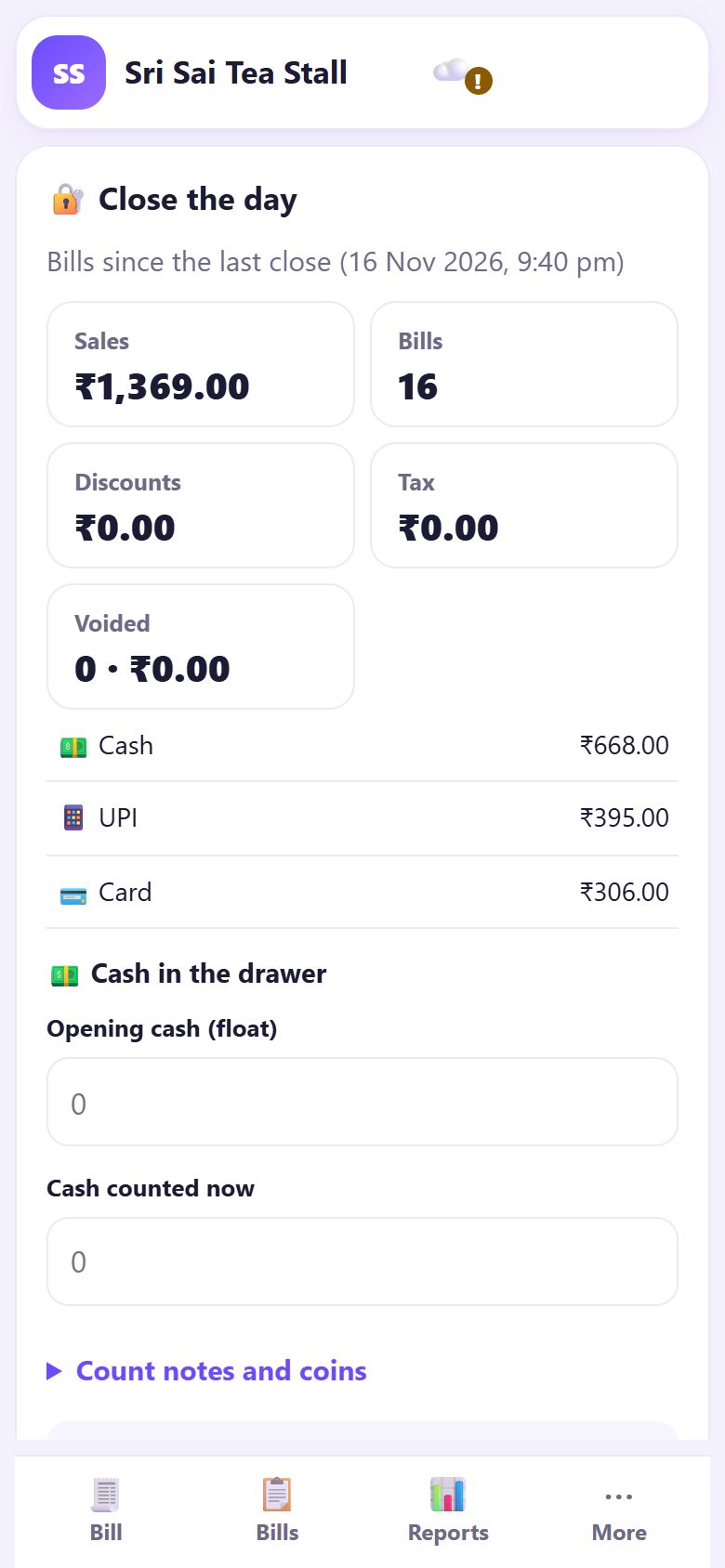
1Open Close day
Tap ⋯ More, then 🔐 Close day (a tab of its own on a PC). At the top you see Bills since the last close with the time of the last close, then Sales, Bills, Discounts, Tax, Voided and the total for each payment: cash, UPI and card.
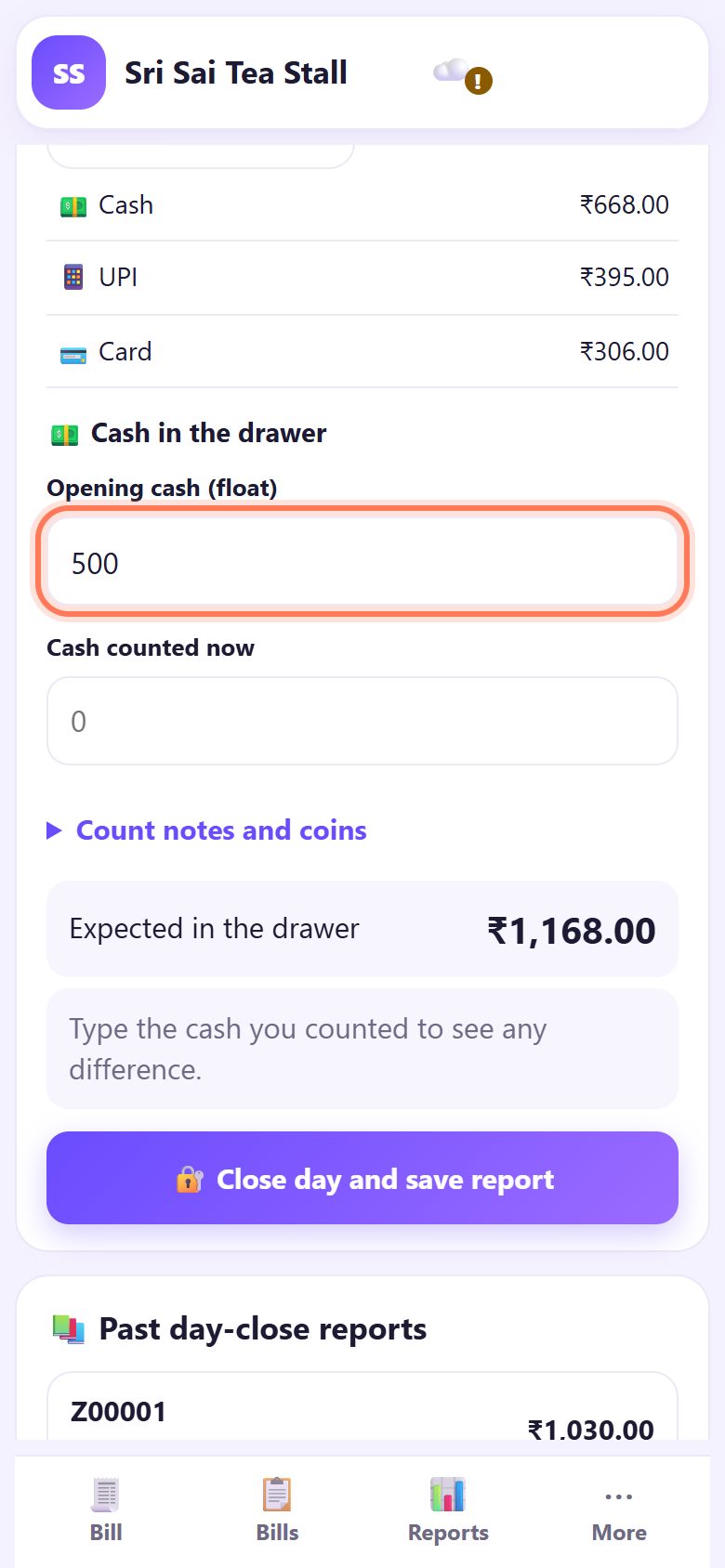
2Type the opening cash
Under 💵 Cash in the drawer, type in Opening cash (float) the change you put in the drawer in the morning, for example 500. It is not a sale, but it is in the drawer, so the counter adds it to what you should have.
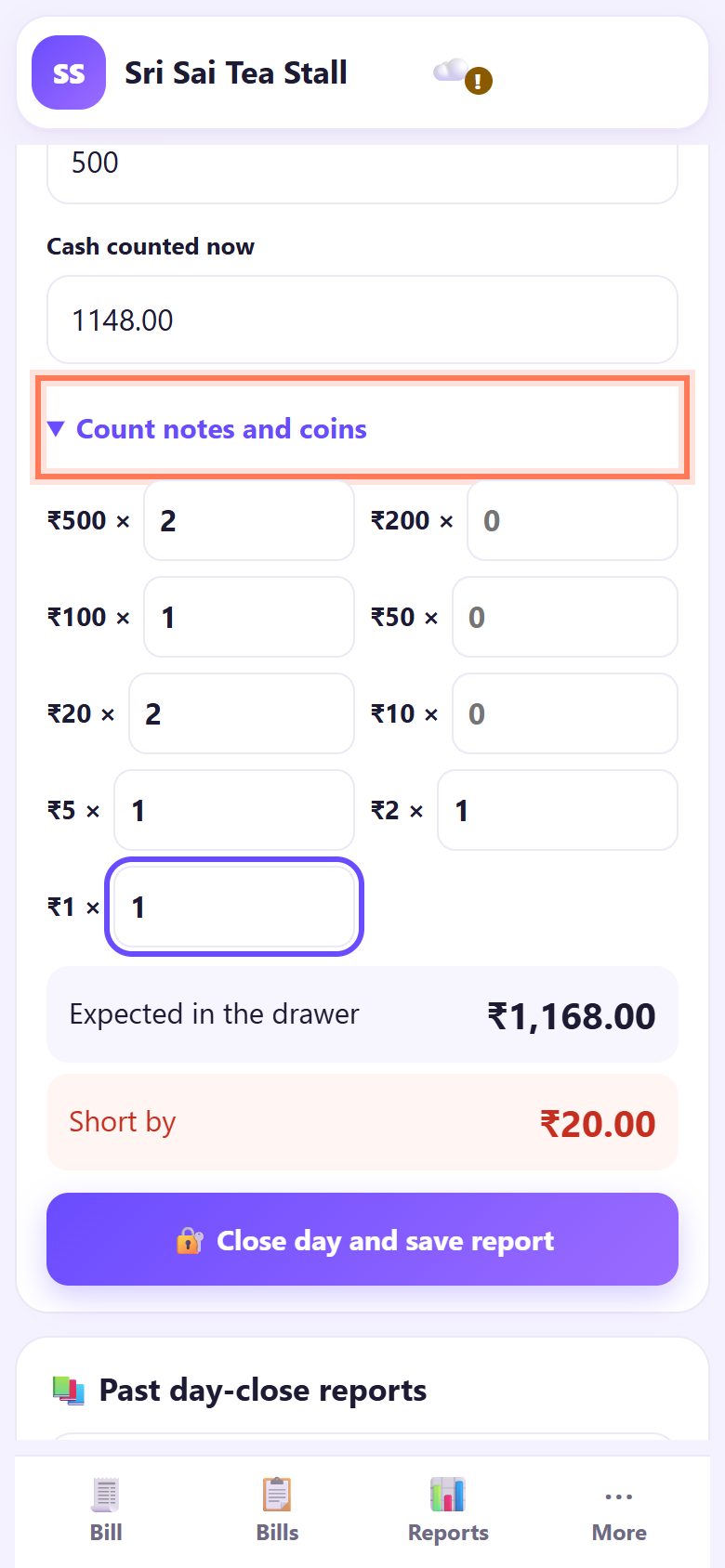
3Count the notes and coins
Tap ▸ Count notes and coins and type how many of each you have: ₹500 ×, ₹200 ×, ₹100 × … down to ₹1. Cash counted now fills itself in. You can also type the total in Cash counted now straight away.
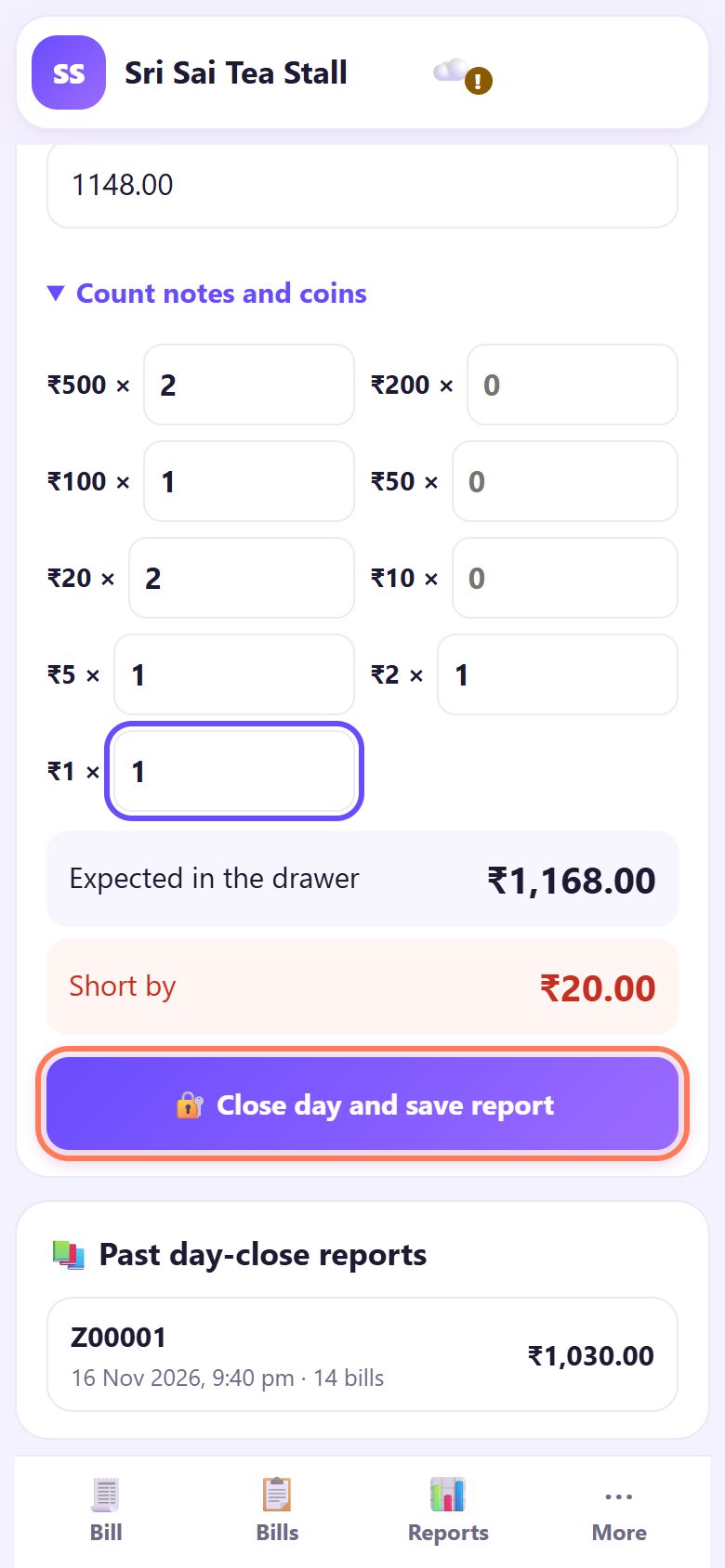
4Check: matches, short or too much
Expected in the drawer is the opening cash plus today’s cash sales. Below it you see Matches ✓, Short by (less cash than expected) or Too much by. A small difference is usually change given wrongly or a UPI payment typed as cash; check the Bills list before you close.
5Close the day and save the report
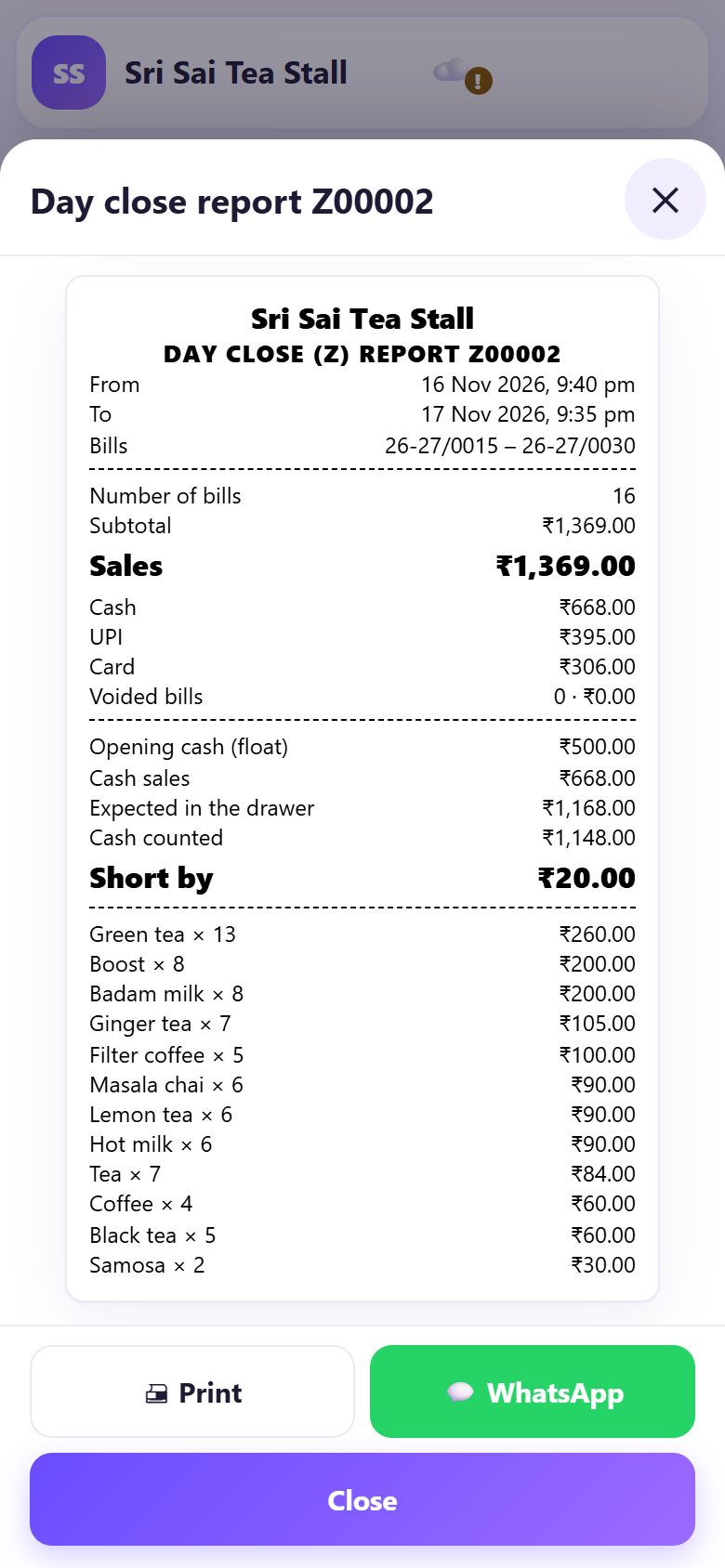
Tap 🔐 Close day and save report. The counter says Day closed. Report Z00002 saved. and shows the DAY CLOSE (Z) REPORT: the bill numbers, sales by payment, the cash check and items sold.
Tap 🖨 Print for a slip on your receipt printer, or 💬 WhatsApp to send it to yourself or a partner.
6Find old reports any time
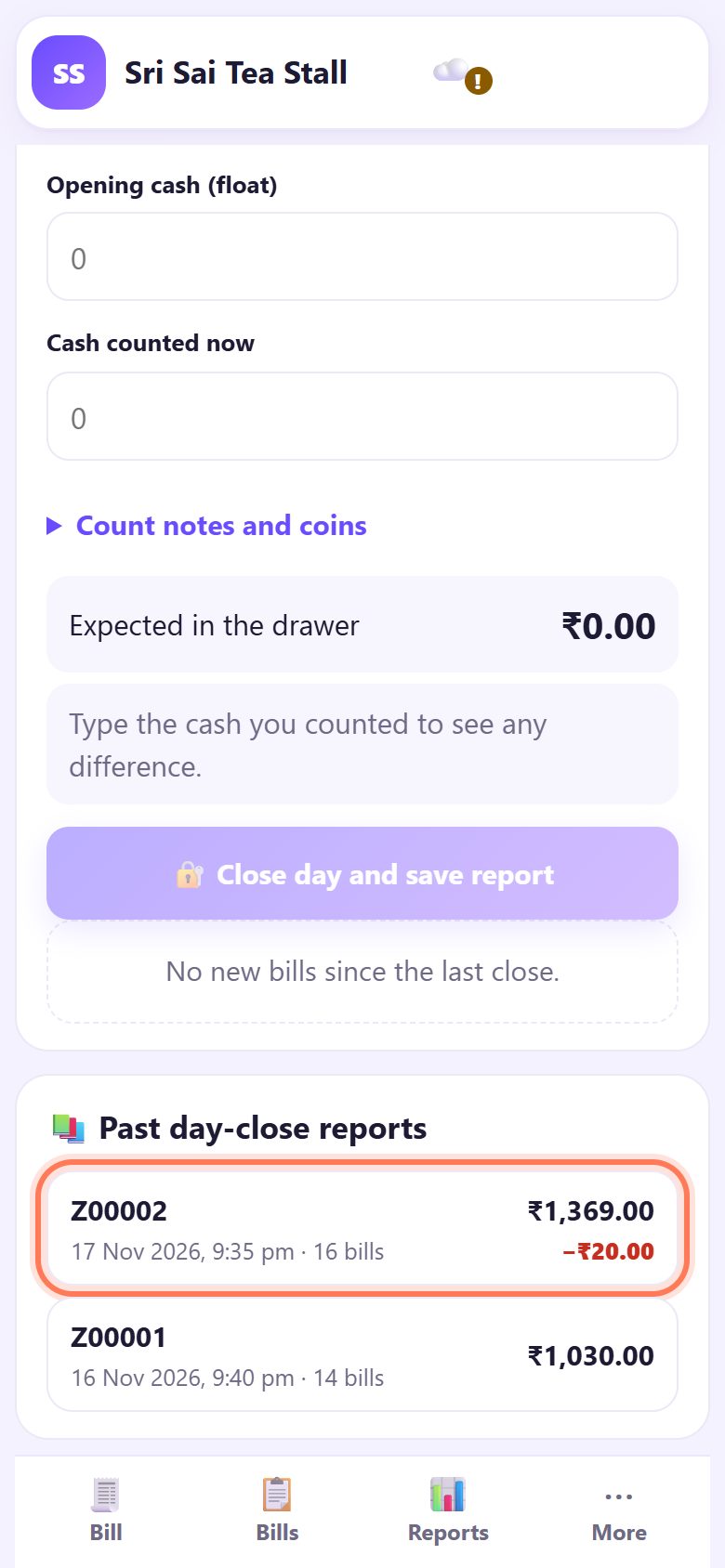
Under 📚 Past day-close reports every close is listed with its number, date, sales and any shortfall in red. Tap one to see or print it again. Reports are numbered Z00001, Z00002… and never change.
💡 What comes next: See how the week and the month went, and download the GST summary for your CA.
☕ Cafés with shifts
With café mode and Shifts with opening cash, cash in / out turned on, this screen is called Shift. You open a shift with the float, record cash in and cash out (like paying the milk supplier), close the shift, and then close the day. Part 14 of this series shows it step by step.
📝 Example: closing time at Sri Sai Tea Stall
At 9:35 pm Ramesh opens Close day. Sixteen bills since last night: ₹1,369 in all, ₹668 of it in cash. He put ₹500 in the drawer in the morning, so the counter expects ₹1,168.
He counts two ₹500 notes, one ₹100, two ₹20, and a few coins: ₹1,148. The screen says Short by ₹20. Checking the bills, he finds a ₹20 bill marked cash that a customer actually paid by UPI. He makes a note, taps Close day and save report, and sends Z00002 to his brother on WhatsApp.
🛠 If something goes wrong
The Close day button is grey
There are no new bills since the last close (“No new bills since the last close.”). There is nothing to close yet.
It asks for a PIN
An owner PIN is set, so only the owner (or staff allowed to close) can close the day. Type the PIN.
“Close the open shift first, then close the day.”
Café mode with shifts is on and a shift is still open. Close the shift on the same screen first.
I am short every day
Look at the Bills list for cash bills that were really UPI, and at Voided bills. Give helpers their own staff PINs (part 13) so the report shows who billed.
I closed the day too early
Nothing is lost. Later bills go into the next close; you can close again at night and both reports stay in the list.
Print did not start
Check the printer is paired and on, then tap Print again. You can also share the report on WhatsApp instead.
🔒 Privacy in plain words
- Day-close reports are saved only on this device and in your own backups.
- WhatsApp only opens WhatsApp with the report text; you choose whom to send it to.
- SpriteSplit never sees your sales or your cash count.
Questions people ask
Do I have to close the day?
No, billing works without it. But closing every night gives you a numbered record and catches cash mistakes the same day.
What does Z report mean?
It is the usual name for an end-of-day report on a cash register. Counter Billing numbers them Z00001, Z00002…
Does UPI money count in the drawer?
No. Only cash is expected in the drawer. UPI and card totals are shown separately so you can match them with your bank or soundbox.
Can I close at 2 am after a late night?
Yes. A close covers all bills since the last close, whatever the date. The report shows the exact from and to times.
Can I change a report after closing?
No. Reports cannot be edited, which is what makes them useful. Fix mistakes on the bills (void or refund) and they show in the next report.
📚 Counter Billing step by step
All 21 parts
- 1Set up your counter
- 2Make a bill
- 3GST invoice and bill types
- 4Print, WhatsApp and QR receipts
- 5Menu: items, sizes, photos
- 6Close the day, count cash
- 7Reports & GST summary
- 8Backup, restore, PIN lock
- 9Café mode and tables
- 10Connect a kitchen screen
- 11Send KOTs to the kitchen
- 12Add a second counter
- 13Staff, roles and PINs
- 14Shifts and cash
- 15Refunds and credit notes
- 16Udhaar (credit) and dues
- 17Stock and recipes
- 18Owner dashboard
- 19Owner view on your phone
- 20Pharmacy set-up and medicines
- 21Daily pharmacy billing