How to give udhaar (credit) and collect dues in Counter Billing
Regular customers often say “write it down, I’ll pay on Saturday”. In a notebook those amounts get lost or argued about. In Counter Billing a credit bill is a normal bill with a number, saved with the customer’s name. The Credit (dues) list adds up what each person owes, payments come off as they arrive, and a polite WhatsApp reminder is one tap away.
Steps
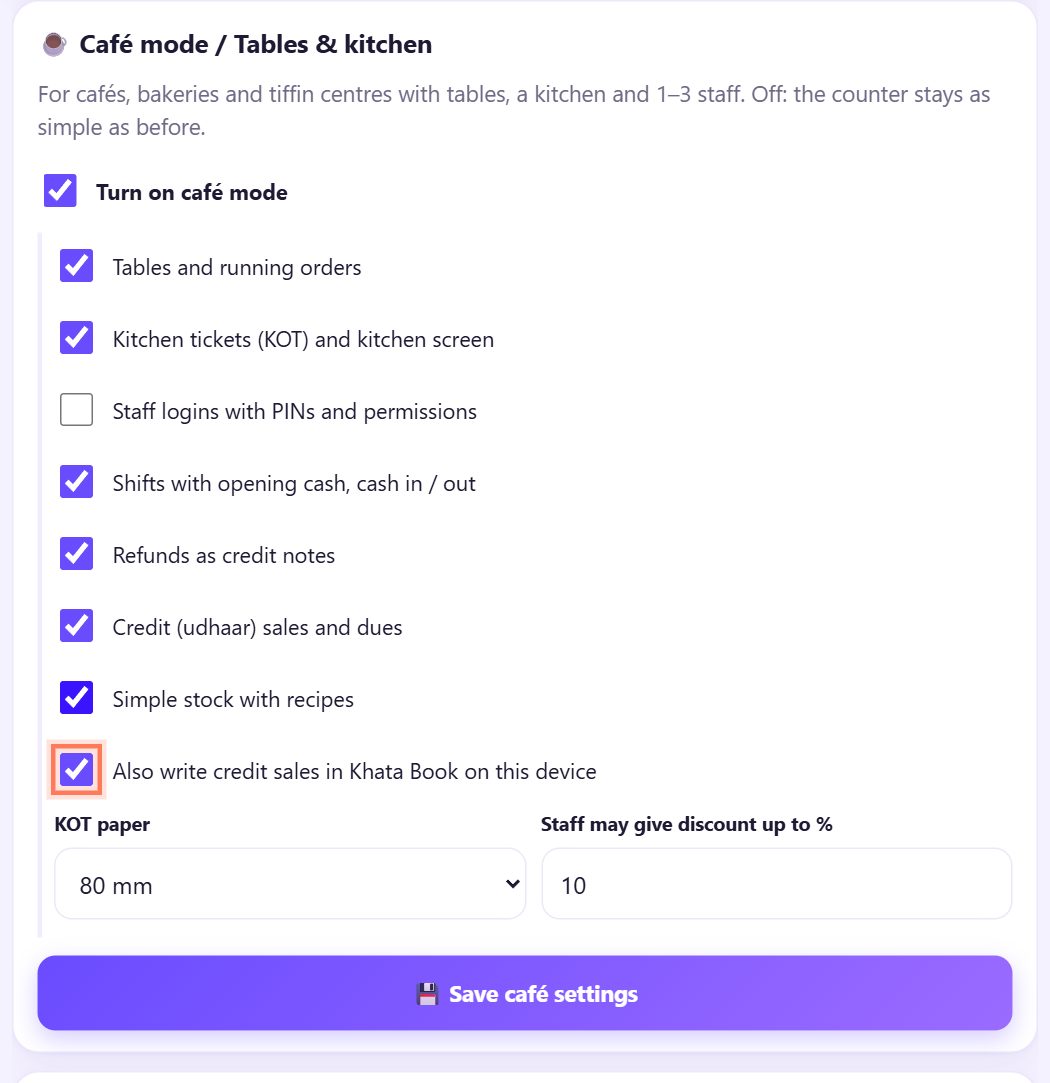
1Turn on credit and the Khata Book link
In ⚙️ Settings › ☕ Café mode / Tables & kitchen, tick Credit (udhaar) sales and dues. If you also use our free Khata Book on this device, tick Also write credit sales in Khata Book on this device. Tap 💾 Save café settings.
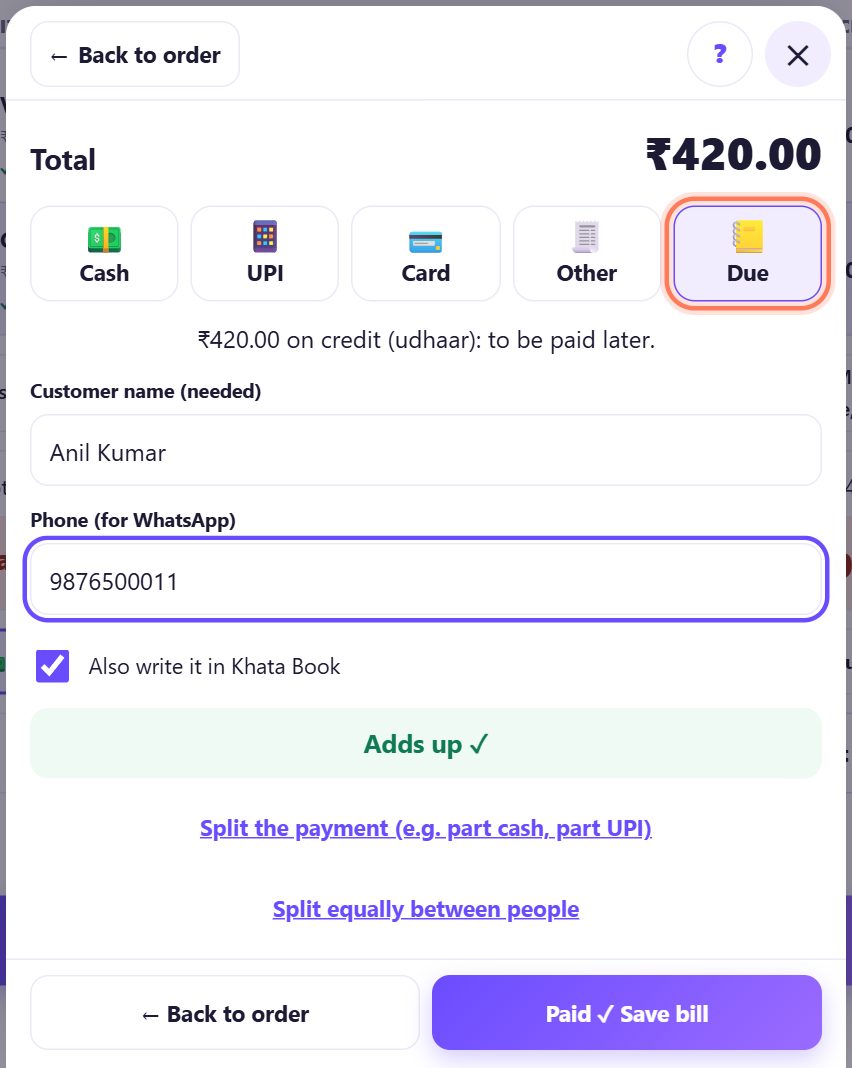
2Pay › Due: save the bill on credit
Make the bill as usual and tap Pay. Choose 📒 Due. The sheet says ₹420.00 on credit (udhaar): to be paid later. Type the Customer name (needed) and the Phone (for WhatsApp), keep Also write it in Khata Book ticked, and tap Paid ✓ Save bill.
Part now, part later? Tap Split the payment and put the rest on Due.
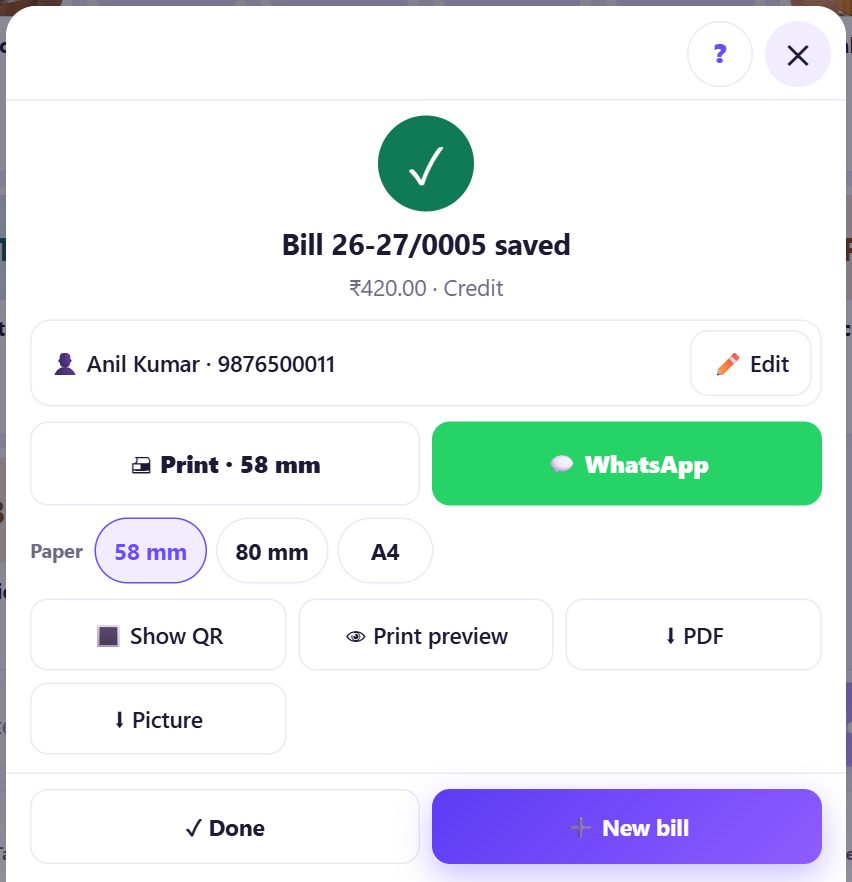
3The bill is saved with a number
The bill gets the next number like any other and shows Credit as the payment. Print it or send it on WhatsApp so the customer has a copy of what they owe.
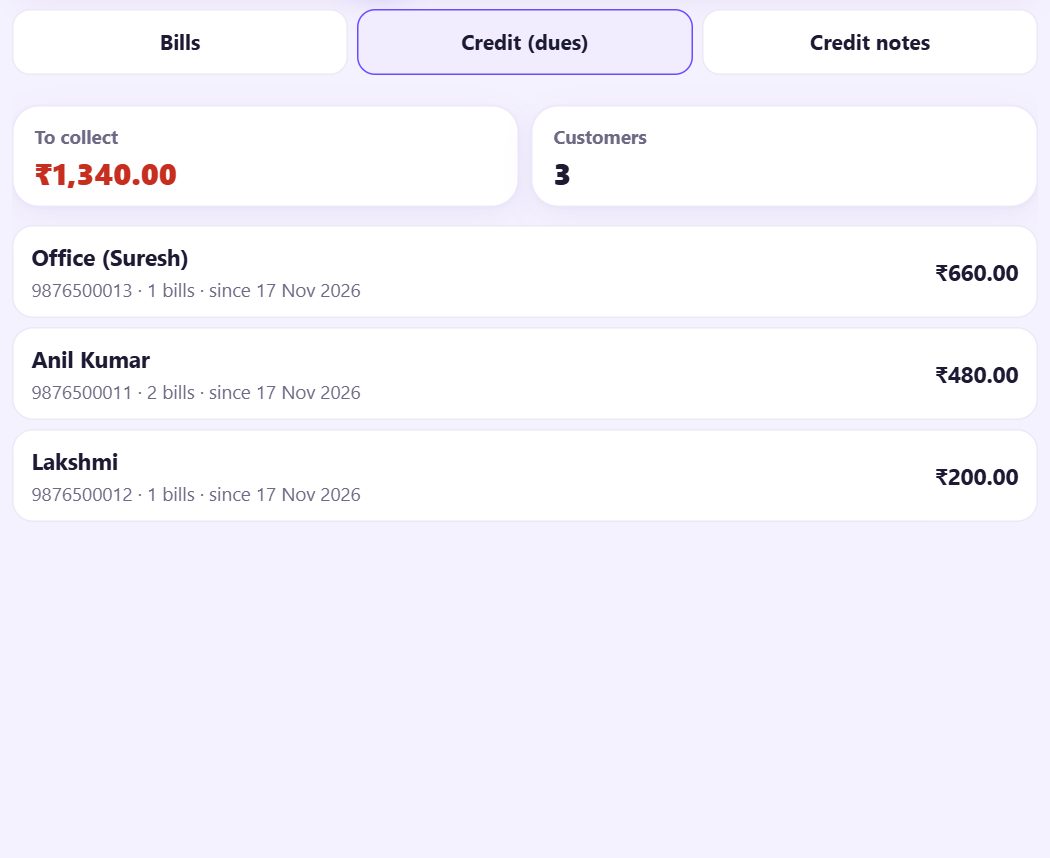
4See who owes you: Credit (dues)
Open 📋 Bills and tap Credit (dues). To collect is the total owed, then each customer with their phone, how many bills, since when, and the amount. The same name and phone are added together, so use the same spelling each time.
5Take a payment, full or part
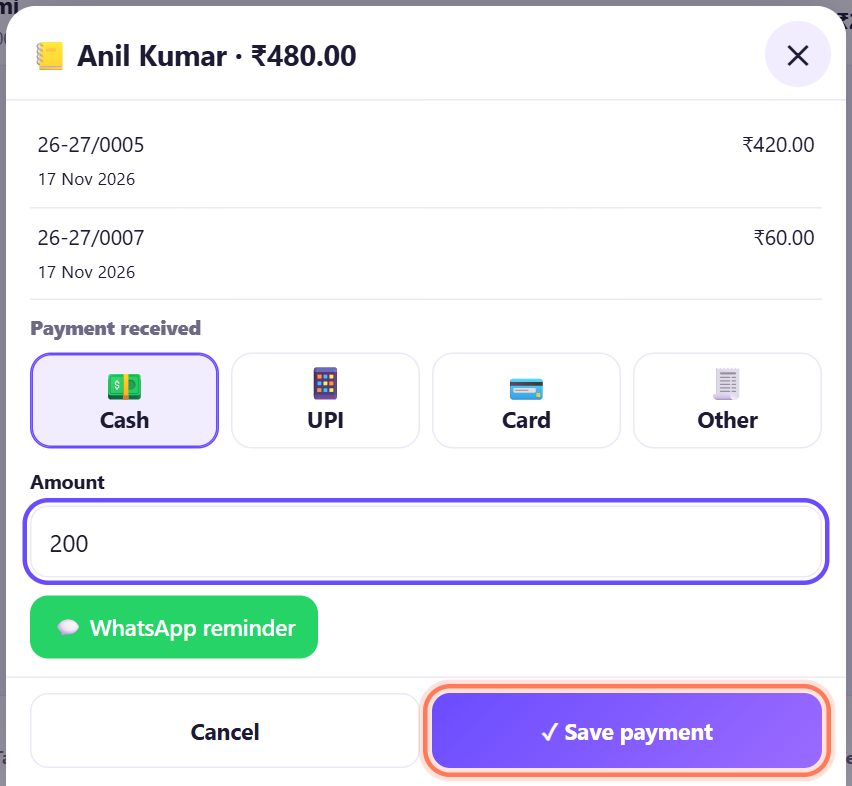
Tap the customer. Their unpaid bills are listed. Under Payment received pick Cash, UPI, Card or Other, type the Amount (all or part) and tap ✓ Save payment. The oldest bills are paid off first and the rest stays on the list.
A cash payment goes into the shift’s expected cash.
6Send a polite WhatsApp reminder
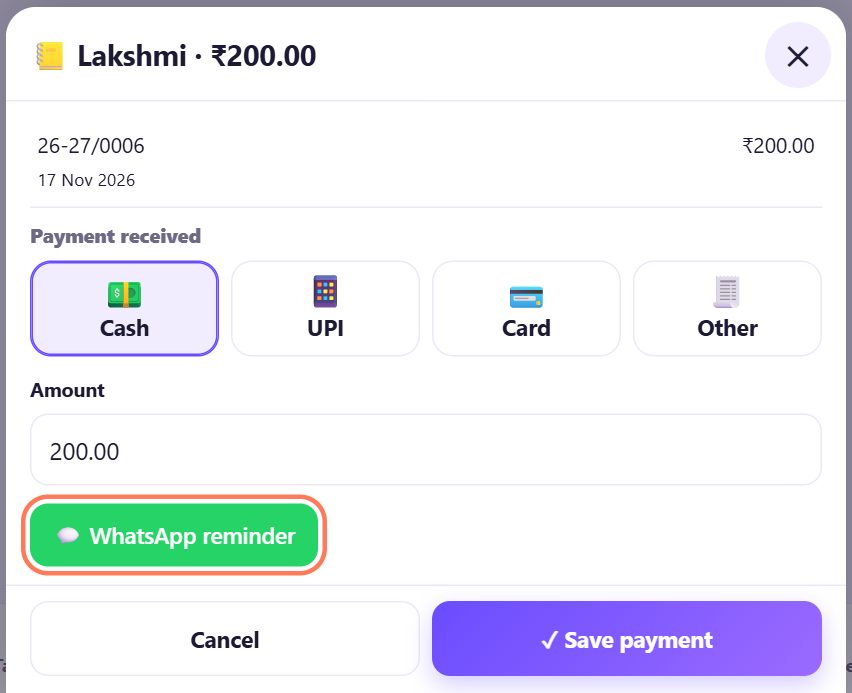
In the same sheet, tap 💬 WhatsApp reminder. WhatsApp opens with the message ready: Hello Lakshmi, ₹200.00 is pending at Chai & Co Café. Please pay when convenient. Thank you! You check it and press send.
The app never sends anything by itself.
7The same dues in Khata Book
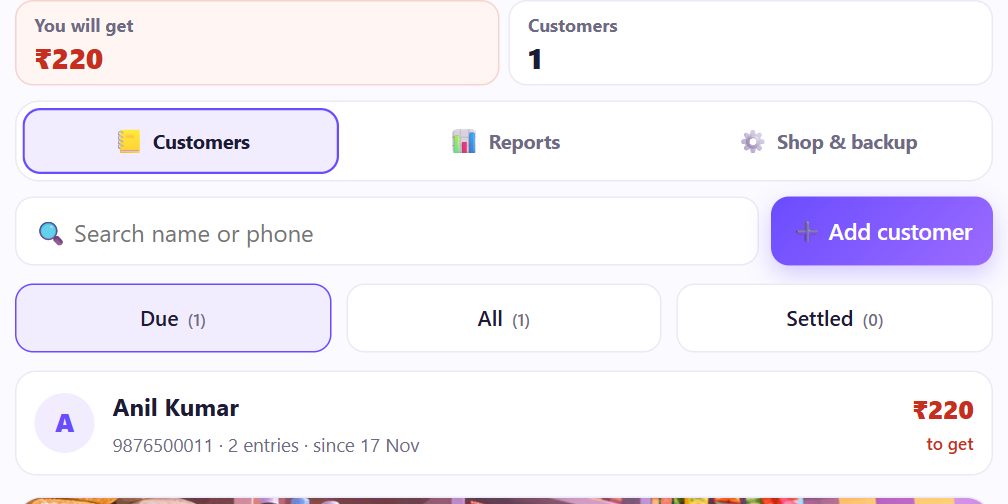
If the Khata Book box was ticked, open spritesplit.com/khata on the same device: the customer is there with the credit and the payment, so your udhaar register and your bills agree. Payments taken at the counter are written there too.
8Credit in your reports
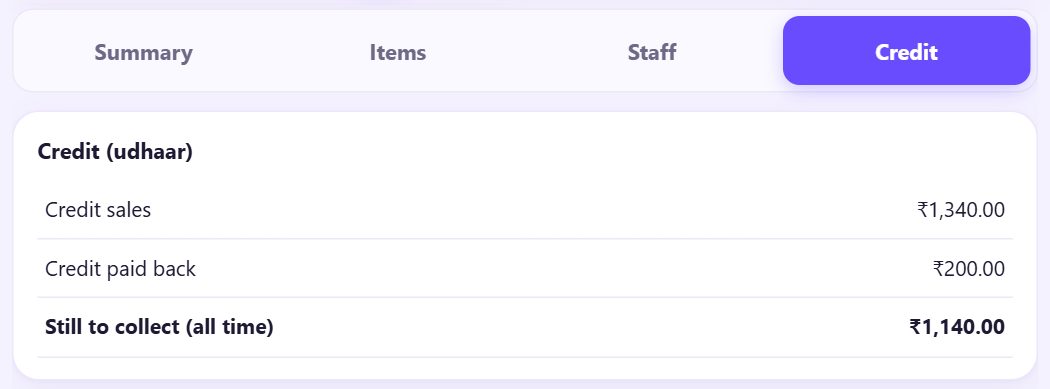
In 📊 Reports, the Credit tab shows Credit sales and Credit paid back for the dates you pick, and Still to collect (all time). The payment donut on the dashboard shows Credit (due) as its own colour.
💡 What comes next: Know before milk or cups run out: add stock items and simple recipes.
📝 Example: the office account at Chai & Co Café
Suresh orders tea and sandwiches for his office every evening and pays on Friday. Each order is saved with 📒 Due under “Office (Suresh)” and his phone. On Friday Ravi opens Credit (dues): ₹660 for the week. Suresh pays ₹500 by UPI, Ravi types 500 and saves the payment, and ₹160 stays on the list.
Lakshmi has owed ₹200 since Monday. Meena taps 💬 WhatsApp reminder, reads the polite message and sends it. Nobody had to ask at the counter in front of other customers.
🛠 If something goes wrong
“Add the customer name for a credit (due) bill.”
A credit bill needs a name so you know who owes it. Type it in Customer name (needed).
I do not see Due in Pay
Tick Credit (udhaar) sales and dues in café settings and save.
The same customer shows twice
The name or phone was typed differently. Use the same spelling and phone number each time.
“That is more than the customer owes.”
The payment is bigger than the dues. Type the right amount; give change in cash if needed.
Nothing appears in Khata Book
Both tools must be on the same phone or PC and the same browser, and the Khata Book box must be ticked on the bill.
A credit bill was a mistake
Void it in 📋 Bills if nothing was paid yet. If part was paid, make a refund with Reduce the due (part 15).
🔒 Privacy in plain words
- Customer names and phone numbers stay only on this device, in the browser. They are not uploaded to SpriteSplit.
- A reminder is sent only when you press send in WhatsApp yourself.
- Ask customers before you save their phone number, and delete old entries you no longer need.
Questions people ask
Is a credit bill a real bill?
Yes. It gets the next bill number and is counted in sales on the day it is made; payments later reduce the dues.
Can a customer pay part now and part later?
Yes, with Split the payment at billing, or by typing a part amount in Payment received later.
Do I need Khata Book?
No. The dues list works by itself. Khata Book adds statements and reminders in Telugu and Hindi for customers who are not café regulars.
Can staff give credit?
Credit is a payment method: anyone allowed to Take payment can use it, and every credit bill shows who made it.
Is udhaar shown in the day close?
Yes, as Credit next to Cash, UPI and Card, so it is not counted as cash in the drawer.
📚 Counter Billing step by step
All 21 parts
- 1Set up your counter
- 2Make a bill
- 3GST invoice and bill types
- 4Print, WhatsApp and QR receipts
- 5Menu: items, sizes, photos
- 6Close the day, count cash
- 7Reports & GST summary
- 8Backup, restore, PIN lock
- 9Café mode and tables
- 10Connect a kitchen screen
- 11Send KOTs to the kitchen
- 12Add a second counter
- 13Staff, roles and PINs
- 14Shifts and cash
- 15Refunds and credit notes
- 16Udhaar (credit) and dues
- 17Stock and recipes
- 18Owner dashboard
- 19Owner view on your phone
- 20Pharmacy set-up and medicines
- 21Daily pharmacy billing